
How to Start a Website Improvement Side Hustle With Free Website Reports
TL;DR: Start a website improvement side hustle with free, unbranded reports from SiteAnalyzerFree.com. Save reports as PDFs, use the built-in estimates to prepare quotes, and send website owners a clear plan for fixes. Once a client approves, work with our preferred vendor, Webstix, to handle implementation. You can also sell SEO report packages for $99 or $199, adding value through your review, recommendations, and client support.
Many business owners know their website could be doing more. They just don’t know what needs fixing, what to tackle first, or what it might cost.
That creates an opportunity for a useful side business: help owners understand their website’s problems, put together a clear proposal, and coordinate the improvements.
With SiteAnalyzerFree.com, you can start that conversation with a free website report. Our scanner checks websites across areas including SEO, technical issues, trust, and conversion friction—without requiring a login or email address.
You bring the personal attention. The report gives you a starting point.
Start With a Free Report
Choose a business whose website you’d like to help improve. Local service companies, independent shops, and businesses you already know can be good places to begin.
Run the website through SiteAnalyzerFree.com, then review the results. Visit the website yourself, too. An automated report can highlight potential issues, but your value comes from helping the owner understand which findings matter for their business.
Pick a few clear priorities. A short explanation of three worthwhile improvements is often more useful than a long list of technical terms.
Save the Report as an Unbranded PDF
Once you’ve generated the report, use your browser’s print function and select Save as PDF.
The reports have no branding, making them easy to include with your own proposal. Check the print preview and turn off browser headers and footers if you want to remove the printed URL and date.
Add a brief introduction explaining what you reviewed, the improvements you recommend, and how you can help. Be straightforward about using a website analysis tool: the service you’re offering includes your review, recommendations, and coordination.
Use the Built-In Estimate to Prepare Your Quote
Finding problems is only part of the job. Business owners also want to know what fixing them could cost.

That’s why the estimate built into the report is so useful. It gives you a starting point for putting together a proposal instead of trying to price everything from scratch.
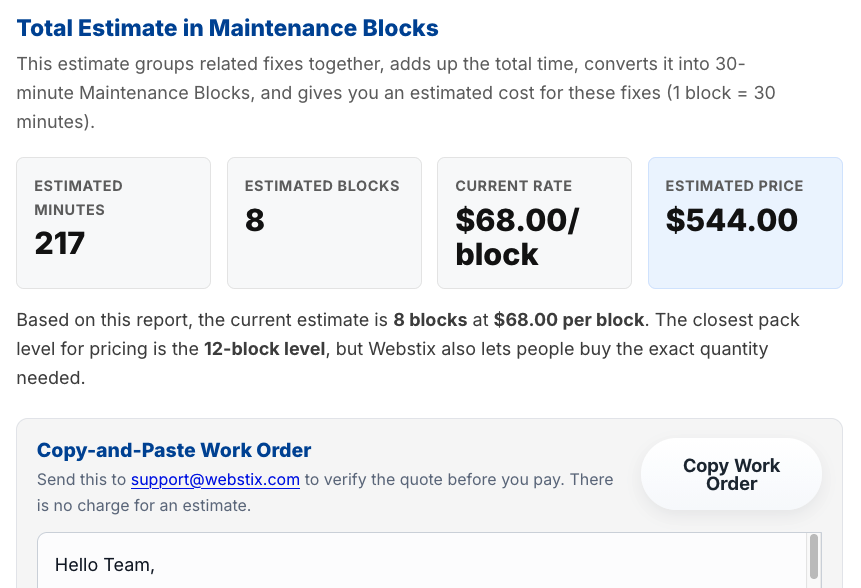
Review the suggested work, confirm the scope and delivery cost, and then prepare your customer-facing quote. Include compensation for your time reviewing findings, communicating with the client, and managing the project.
For example, if confirmed implementation costs are $300 and you charge $450 for the project, the $150 difference covers your coordination and other business expenses. That’s an illustration, not a guaranteed margin. You could possibly mark it up 2-3 times the estimated cost since most small business do want to know what’s wrong with their website.
Treat the report’s estimate as a starting point. Confirm the final scope before committing to a fixed price or completion date.
Send the Owner Something Useful
Send a personal introduction, the PDF report, and a quote for a clearly defined set of fixes.
Keep the message focused on the business. Explain what you noticed, why it deserves attention, and what your proposed service includes. Avoid promising rankings, traffic, or sales that you can’t guarantee.
You don’t need to overwhelm the owner with every finding. Give them a manageable first step and an easy way to discuss it.
Bring in Help to Handle the Fixes
You don’t have to perform every technical task yourself.
When an owner wants to move forward, return to SiteAnalyzerFree.com and use our preferred vendor, Webstix, to help with implementation. Confirm the work, pricing, and schedule with Webstix before finalizing your commitment to the client.
Your role can focus on finding opportunities, explaining recommendations, and keeping the project moving. Webstix can handle the agreed technical work.
Add Paid SEO Reports to Your Services
You can also offer SEO reports as a separate service.
For example, you could purchase an SEO report through SiteAnalyzerFree.com for $29 and offer a package priced at $99 or $199, depending on what you include.
A $99 package could include the report and a concise summary of priorities. A $199 package could add a walkthrough and a more detailed action plan. Those extras are services you provide, so price them with your time in mind.
Your margin is the selling price minus the report cost and your other expenses. Give clients a clear description of what they’re buying and whether implementation is priced separately.
Start With 1-10 Websites
You don’t need a large client list to test this idea.
Choose 1-10 websites, generate free reports, review the findings, and prepare a focused proposal. See if you can help one owner understand what needs attention and offer a practical way to get it done.
Visit SiteAnalyzerFree.com to generate your first free report and start building your website improvement side business.